Home |
Features |
Demo |
Purchase |
Support |
FireShot Pro
|
Documentation
|
Help us!
 |

|

|

|

|
| Firefox | Chrome | Thunderbird | SeaMonkey | Internet Explorer |
How to enter purchased code into FireShot Pro for Internet Explorer.
Thank you for purchasing FireShot. This step-by-step manual will help you activating Pro features and registering FireShot.
- Make sure you downloaded and installed the latest version of FireShot for Internet Explorer from http://screenshot-program.com/fireshot_ie_install.zip
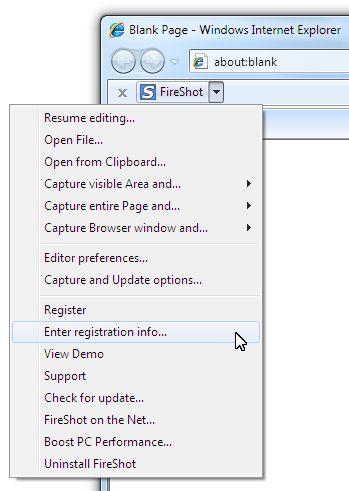
- Launch "Enter License Key" dialog:
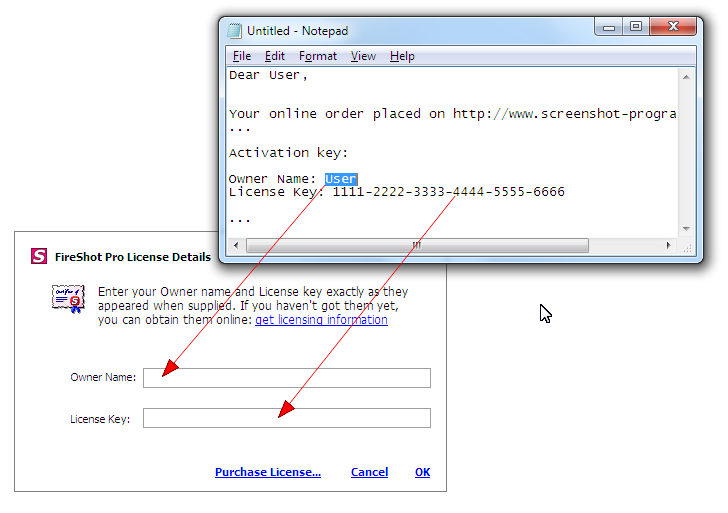
- Use Clipboard Copy & Paste operations to quickly enter the licensing info obtained by e-mail, then press OK.
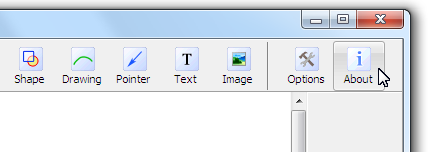
- Open the Editor (by capturing anything and opening in the Edit window) and click "About" button:
Notice Your licensing info:
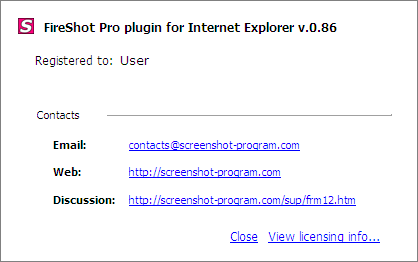
- Congratulations! Now you have FireShot successfully switched to Pro and registered.
See also: How to register FireShot Pro for Firefox...